Cheap Laser Engraver: How to Choose an Affordable Machine
A cheap laser engraver is a worthwhile purchase when it handles your actual material, fits your workspace and leaves enough budget for a complete operating setup. To find an affordable laser engraver, compare the delivered equipment cost, required accessories, support and cost per acceptable part—not just the advertised machine price.
Start with the projects you want to make. A laser engraving machine for wooden gifts has different requirements from equipment for clear acrylic signs or metal identification tags. This guide helps you narrow the specification, compare quotations and decide where spending more would actually help.
What Makes a Laser Engraver Affordable?
Affordability means the complete setup fits both your budget and your work. For an occasional hobby project, a smaller machine with manual positioning may be sufficient. For repeat orders, loading time, rejected pieces and maintenance can matter as much as the purchase price.
Use two figures when comparing offers: the amount needed to start operating and the cost of completing your expected work. Keep the same material, design, finish and quantity in every comparison. A faster sample that produces a different result is not an equivalent test.
If you are still deciding how much to allocate, the laser engraver and cutter cost guide provides the broader purchasing context. Here, the focus is choosing a suitable machine within your available budget.
Choose the Laser Type Before Comparing Prices
Material compatibility is the first filter. A low-priced machine that cannot produce the required finish will consume your budget without solving the project.
| Your main project | Type to evaluate | What to confirm first |
|---|---|---|
| Wooden gifts, paper crafts and approved leather items | Blue diode or CO₂ | Actual material composition, detail quality and completion time |
| Clear acrylic signs or components | CO₂ | Acrylic type, thickness, edge finish and extraction requirements |
| Logos or identification on metal parts | Fiber marking system | Exact alloy, coating, contrast and whether material removal is required |
| Coated drinkware | Application-dependent laser and rotary setup | Coating response, cylinder clearance, fixture and supported rotary workflow |
| Mixed products sold in batches | System matched to the most frequent job | Loading, alignment, processing and inspection time for a full batch |
These are starting points for sample testing. “Works with metal” may describe a surface mark, removal of a coating or engraving into the base material. Ask the supplier which result the quoted configuration can deliver.
Blue Diode: Start with Wood and Craft Projects
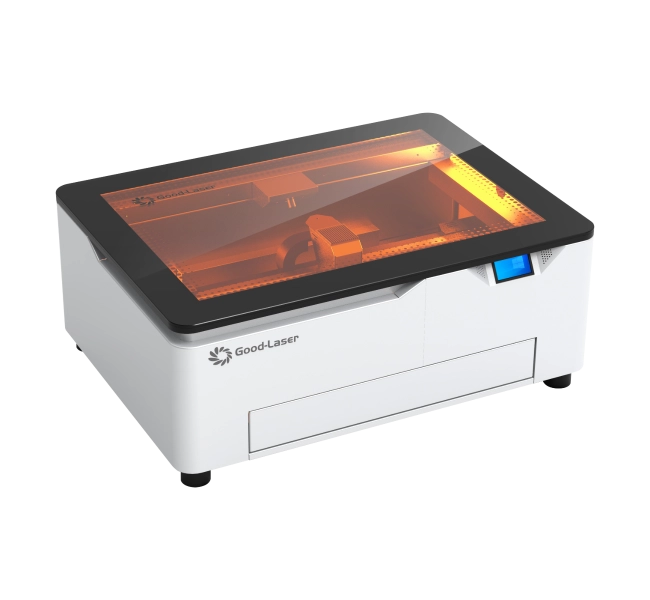
For wood-based projects, Good-Laser's diode laser engraving machine range provides a relevant starting point. The Light Blue 530 page lists 20W/40W laser options, a 520 × 315 mm working area and an enclosed design with a lid interlock. Confirm the selected version and included accessories in the quotation.
Compare optical laser output rather than treating total electrical consumption as engraving power. Also check the workpiece height: a bed that accommodates a flat board does not automatically accommodate a tall box or a rotary attachment.
CO₂: Evaluate It When Acrylic Is Central to the Work
If clear acrylic is a core material, compare a suitable CO₂ setup early. Blue diode light is poorly absorbed by clear acrylic; buying a higher-wattage blue diode does not remove that basic material limitation. The distinction is explained in this manufacturer's acrylic processing guidance.
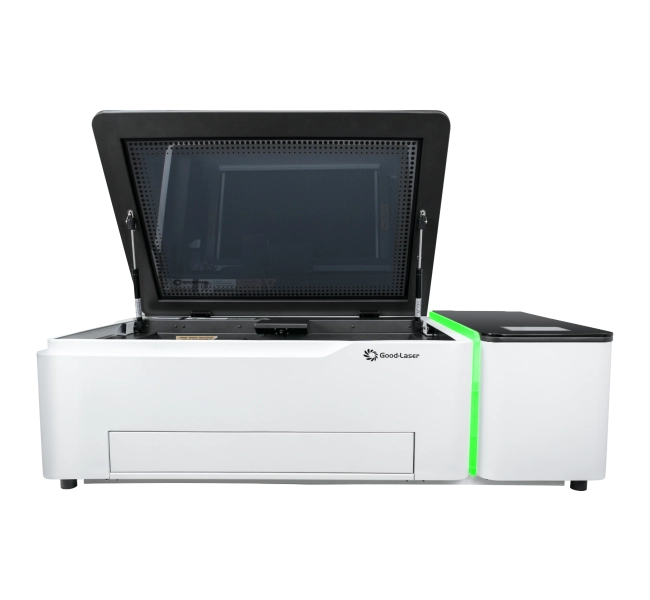
Good-Laser's desktop laser engraver and cutter range includes the Light 530 CO₂ machine. Use it as a comparison point when requesting a quote for acrylic or mixed non-metal projects. Specify whether you need engraving, cutting or both, and ask what cooling, air assist and exhaust equipment is included.
Fiber: Compare the Required Metal Marking Result
For metal identification, evaluate fiber laser marking machines such as the Good-Laser Mark M20. Send the actual alloy and coating details, together with the logo, serial number or code you need to reproduce. Agree on contrast, size and any depth requirement before comparing price.
Choose the configuration from the sample result and a written specification identifying the exact source, lens, marking field and software supplied. Include the largest part and smallest detail in the sample request. A product family name alone does not define the package you are buying.
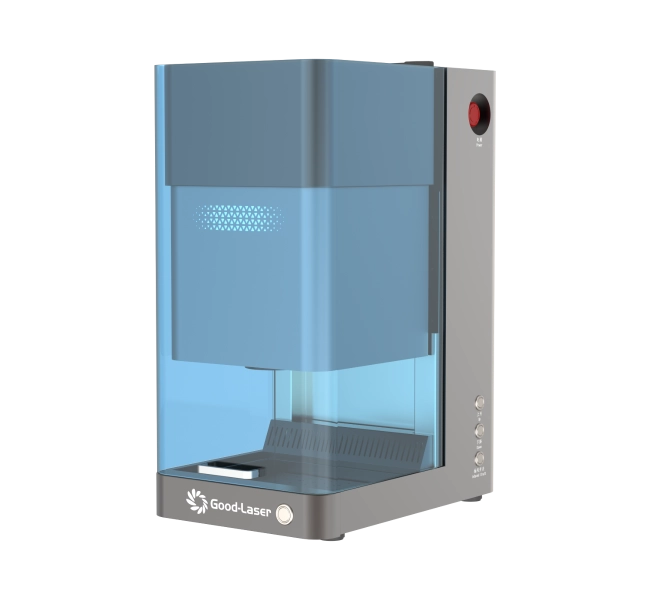
These models illustrate different application routes. Their inclusion does not establish that they are the lowest-priced options or that they fit a particular spending limit. Request a current delivered quotation for your location.
Compare the Complete Setup Cost
Ask each supplier to separate included equipment, required extras and optional upgrades. This makes a basic machine offer comparable with a bundle and prevents accessories from being counted twice.
| Budget item | Question for the supplier | Why it affects affordability |
|---|---|---|
| Machine and laser configuration | Which source, power option, work area and controller are included? | Similarly named packages may offer different capabilities. |
| Protective enclosure and extraction | What is supplied, and what must the installation provide? | The machine price may exclude equipment needed for the workspace. |
| Air assist and cooling | Are the required pump, cooling equipment and connections included? | Requirements depend on the laser and process. |
| Software and computer | Which software license, operating system and connection are supported? | An existing computer or license may not fit the selected controller. |
| Fixtures, rotary and test blanks | Which accessories are necessary for the first paid or planned project? | Application-specific parts can change the starting total. |
| Delivery and service | What freight, taxes, installation, warranty exclusions and service charges apply? | A machine-only quote leaves important costs unresolved. |
For workplace use, assess the installation as well as the machine. OSHA's laser safety guidance discusses protective housings, access controls and other hazards. Follow the manufacturer's operating instructions and the requirements applicable to your location. An enclosure does not eliminate the need to manage fumes or supervise processing.
Shopping with a $300 or $1,000 Budget
First decide whether your limit covers the machine alone or everything needed to start. The following are purchasing scenarios, not Good-Laser price offers or guaranteed market packages.
If $300 Is Your Total Limit
Keep the first project narrow: one approved material, a small design and occasional use. Obtain a complete equipment list before paying. If the required protective setup, extraction and accessories push the total beyond your limit, consider a supervised makerspace or an engraving service while you validate the project.
If $1,000 Is Your Total Limit
Compare complete quotations against the same acceptance sample. Decide whether a larger usable area, easier positioning or a better-supported workflow would solve a real problem. Leave room for installation and initial test materials. The budget figure alone cannot guarantee suitable performance on clear acrylic, bare metal or thick stock.
If You Plan to Sell Engraved Products
Set the budget around realistic demand. Estimate orders you can plausibly fulfill, and include setup, finishing, rejected blanks and operator time. Use a small trial batch to establish these figures. Machine ownership does not guarantee profitable sales, and unused production capacity cannot repay a higher purchase price.
A Simple Cost Comparison for Repeat Work
Compare accepted output rather than maximum advertised speed. Time the same artwork on the same material and include loading, positioning, processing, cleaning and checking the finished piece.
Illustrative example only: suppose two complete setups cost USD 1,000 and USD 1,600. On the same acceptable job, the second saves three minutes of paid operator time per piece. At an assumed USD 20 per hour, that is USD 1 per piece. Recovering the extra USD 600 through that saving would require 600 pieces.
If the three-minute difference is only unattended cycle time and does not reduce labor or increase useful output, the labor saving is not established. Likewise, if you expect just 100 pieces, this example would not justify the extra purchase cost on labor savings alone. These figures are an arithmetic example, not machine prices, measured performance or an earnings forecast.
A useful batch measure is: materials, labor, consumables and allocated equipment cost divided by the number of accepted pieces. Use the same accounting period for both machines and include rejected blanks in the numerator.
Where to Save—and What to Verify Before Ordering
Remove features your first projects do not need, while keeping the equipment required for the selected process. A rotary is useful for suitable cylindrical work; it provides little immediate value for flat wooden tags. A larger bed helps only if your layouts or batch volume use it.
| Possible saving | Reasonable when | Verify before committing |
|---|---|---|
| A smaller working area | Your largest part and its fixture fit comfortably. | Usable travel, clearance and positioning margins. |
| Manual focusing or positioning | Low volume makes the extra setup time acceptable. | A repeatable method on your actual part. |
| Fewer optional accessories | You have a defined first application. | Which items are essential and which can be added later. |
| A used or refurbished machine | Condition and support can be checked. | Sample output, service history, safety functions, parts and license transfer. |
Before paying, request a sample made from your supplied artwork and representative material. Record the machine configuration, finish requirement, processing settings and total job time. For repeat production, ask to see several pieces so you can assess consistency rather than relying on one attractive photograph.
Also confirm who handles installation questions and replacement parts. A written response about support scope, service location and excluded costs is more useful than an unqualified promise of “lifetime support.” After selecting the equipment, use the laser engraver setup and first-project guide to plan the operating workflow.
Frequently Asked Questions
Is a cheap laser engraver worth buying?
Yes, when a representative test demonstrates the result you need and the complete operating setup fits your budget. Small, occasional projects may not need a large bed or extensive automation. Check material compatibility, installation requirements and support before deciding that the lowest advertised price is the best fit.
What is the most affordable type of laser engraver?
The answer depends on the material and the required result. Compare blue diode systems for compatible craft projects, CO₂ systems for applications such as clear acrylic, and fiber systems for suitable metal marking work. The affordable choice is the lowest-cost complete setup that passes your acceptance test; no single type wins for every application.
Can a budget laser engraver engrave metal?
Some configurations can mark particular metal surfaces or remove coatings, but that does not prove they can engrave to a specified depth in bare metal. Provide the alloy, finish and desired result when requesting a sample. For metal-focused work, compare an appropriate fiber marking configuration before choosing a craft machine on price alone.
Do I need to buy the highest laser power I can afford?
Choose power around a verified task. Compare output quality and the complete job time, and establish whether quoted watts refer to optical output or electrical consumption. Additional power is useful only when the laser type, motion system and material are suitable. It does not guarantee better detail or solve every material limitation.
Is a used laser engraver a better budget option?
It can be, if the purchase price plus inspection, repairs, installation and missing accessories remains attractive. Ask for a working demonstration on representative material. Verify the condition of the laser source, optics, motion components and protective systems, as applicable, and confirm that software access and replacement parts remain available.
How do I compare two laser engraver quotations?
Give both suppliers the same material, artwork, part dimensions, finish and expected quantity. Ask for the exact configuration, included accessories, delivered cost and service terms. Compare a timed sample or batch at the required quality. Separate missing information from actual differences so a lower but incomplete quotation does not appear better by default.
Find an Affordable Good-Laser Setup for Your Projects
Start with the work you want to produce and the total amount you can allocate. Share your material and coating, artwork, largest part size, intended finish, expected monthly quantity and delivery country. Include whether your budget covers the machine only or the complete installation.
Contact Good-Laser for a suitable configuration and quotation. The team can discuss Light Blue 530, Light 530 or Mark M20 options against your application, helping you identify the equipment and accessories needed for a practical starting setup.