CNC Laser Cutter vs CNC Router: Which Machine Should You Choose?
Choose a CNC laser cutter for detailed flat shapes, fine engraving and repeatable work in laser-compatible sheet materials. Choose a CNC router for pockets, grooves, thick boards and carved surfaces. For signs, gifts and models, the decision usually comes down to the material, the depth of the features and the finish your customer expects.
Both machines use computer-controlled motion. A laser cutter removes material with a focused beam; a router removes chips with a rotating tool. Here, the main comparison is between a workshop CO₂ laser cutter and a CNC router. Industrial metal-cutting lasers and small fiber marking machines serve different jobs and should be evaluated separately.
When comparing a laser engraving machine with a router for cutting and engraving jobs, ask each supplier to work from the same drawing and material specification. That makes the differences in finish, setup and usable output easier to judge.
CNC laser cutter vs CNC router at a glance
| Buying question | CNC laser cutter, mainly CO₂ | CNC router |
|---|---|---|
| What work suits it? | Fine outlines, lettering and engraving on compatible sheets | Pockets, grooves, shaped edges, relief carving and thicker components |
| How does it cut? | Concentrated heat, with no rotating cutter contacting the workpiece | A rotating bit physically removes material |
| What limits small details? | Beam focus, kerf, material response and heat | Tool diameter, tool reach and the rigidity of the setup |
| Can it control pocket depth? | Repeated engraving can remove depth, but a flat, dimensioned pocket needs process validation | Programmed Z-axis toolpaths suit pockets and stepped depths |
| What happens to the edge? | Wood can darken; suitable acrylic can have a glossy edge | A machined edge that may need sanding, deburring or polishing |
| What support does the workshop need? | Enclosure, appropriate exhaust, air assist and source-specific cooling | Secure workholding, guarding and dust or chip collection |
| What proves the machine is suitable? | A sample cut in your actual material at an acceptable finish and cycle time | A sample meeting the required dimensions, depth and surface finish |
Neither the laser's advertised travel speed nor the router's spindle power tells you how many finished parts you can make in a day. The operations on the drawing come first.
Which machine fits the products you want to make?
Flat signs, personalized gifts and model parts
A CO₂ laser is a practical starting point for acrylic lettering, engraved plaques and small plywood components. It can engrave a design and cut its outline in one setup without changing a physical cutting tool. Small openings and closely spaced shapes are often easier to produce with a narrow laser cut.
For laser cutting architectural models, a flat-sheet workflow suits walls, windows and other pieces that are assembled afterward. A contoured terrain base has a different requirement: a router can remove material at varying depths to form the surface.
Furniture parts, recessed signs and dimensional components
Choose a router when the drawing calls for hinge recesses, dados, slots, chamfers or a shaped profile. A laser can remove material through engraving, but that does not make it a direct substitute for a router cutting a pocket to a specified depth.
A sign with a photograph engraved on its face and a sign with deep V-carved lettering may look similar in a product catalogue. They require different processes. Decide which finish you intend to sell before selecting the machine.
Wood and plywood: look at thickness, joints and edge color
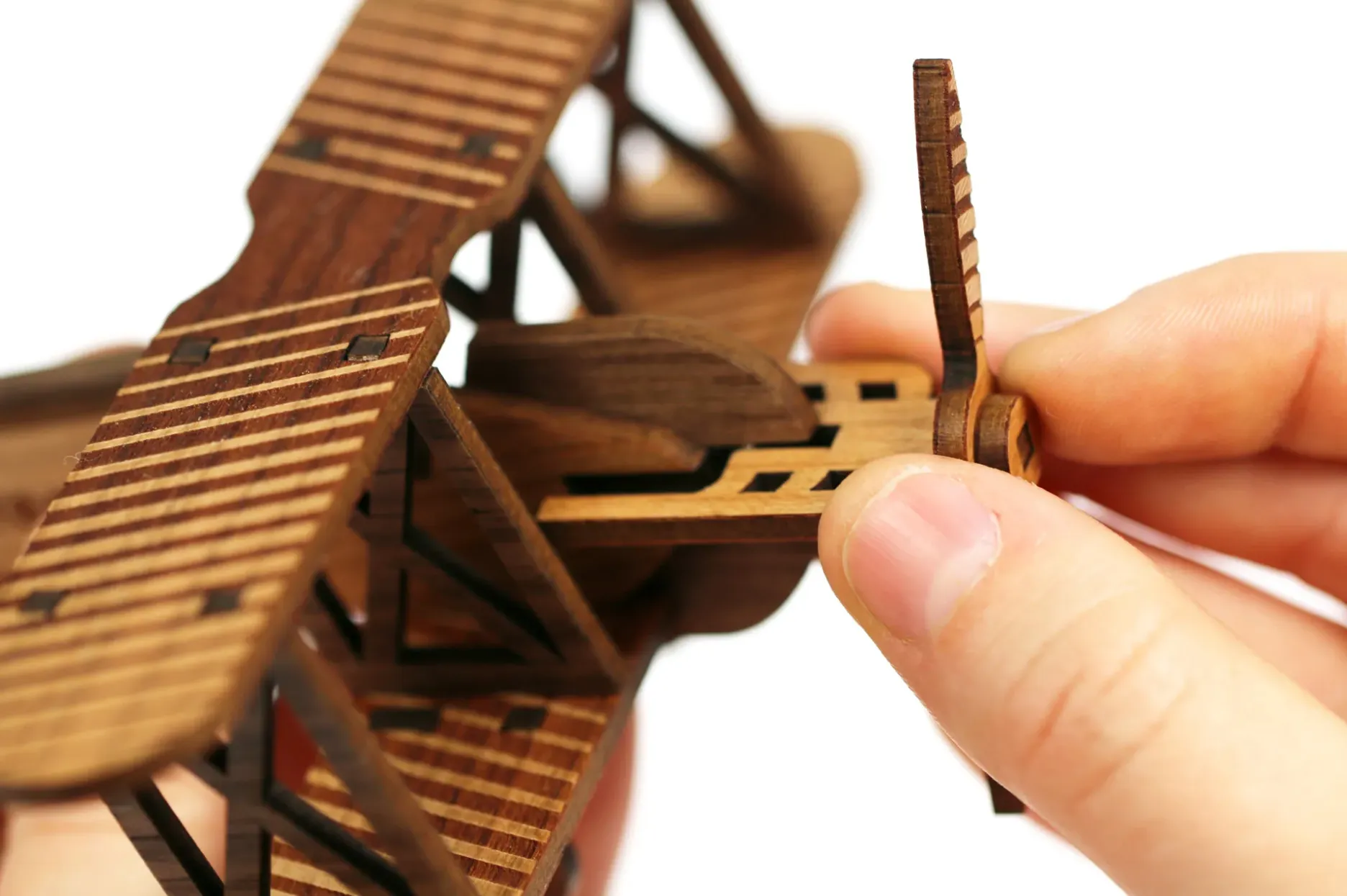
A wood laser cutter is useful for model kits, decorative panels and engraved products whose cut edges can remain dark. Material consistency matters. Glue layers, voids and changes in wood density can leave sections incompletely cut even when a neighboring part separates cleanly.
A router is often the more suitable choice for thick boards, structural joints and parts that need several machining depths. It also avoids a laser-burned edge, although an unsuitable tool or weak hold-down can cause tear-out. Include the required finishing in the comparison.
For a tab-and-slot assembly, test the fit using the actual production sheet. Laser kerf removes material along the outline, while a router's circular bit leaves an internal corner radius. You may need to adjust slot dimensions or add corner relief to the drawing. A successful sample should assemble properly as well as look clean.
There is no universal wood thickness at which every buyer should switch from a laser to a router. Ask for a sample at your normal thickness, including the joints and smallest features you expect to produce.
Acrylic: compare visible edges with machined features
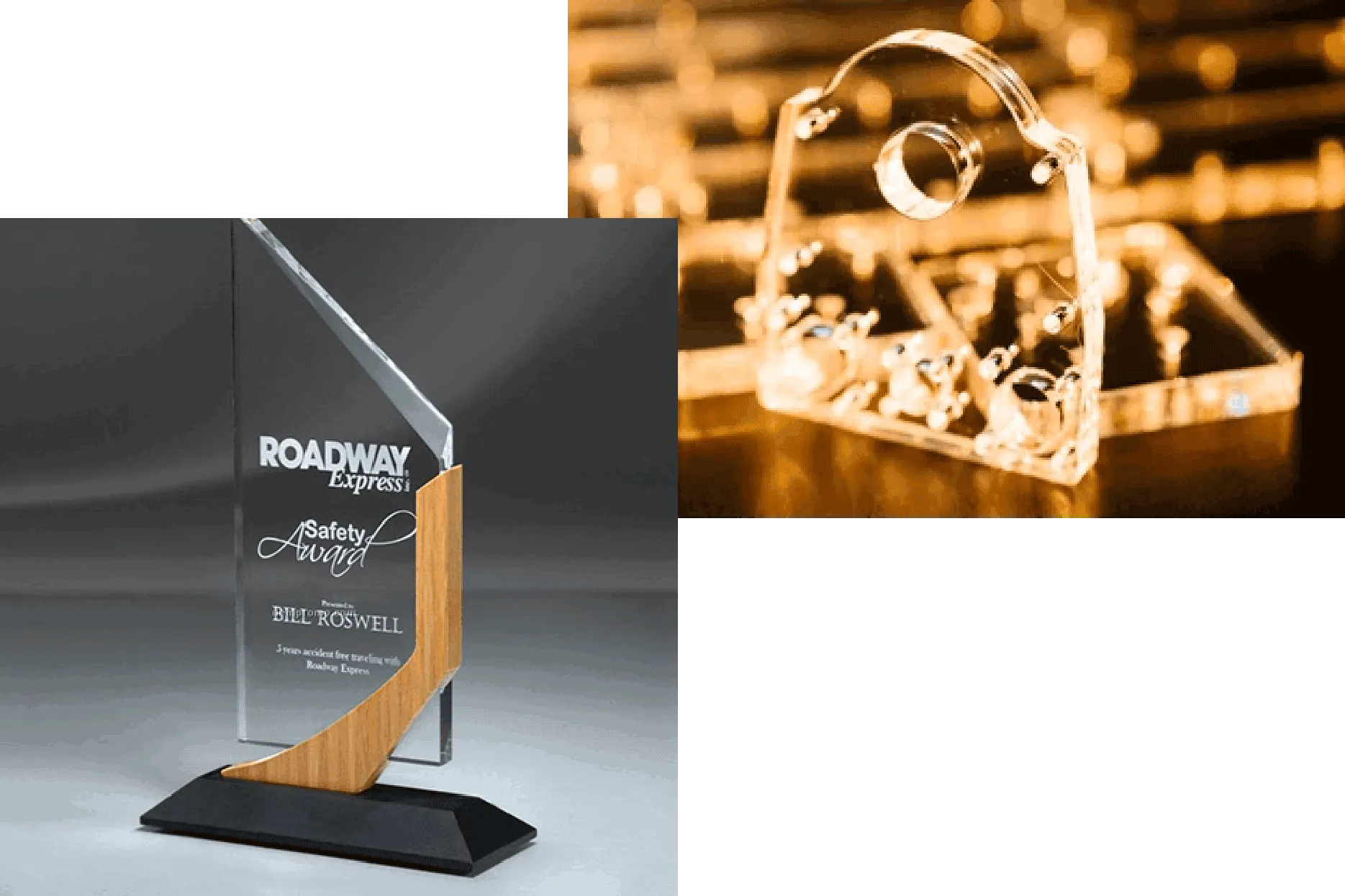
CO₂ lasers are a common choice for clear acrylic signs, display pieces and awards. They can cut a glossy edge on suitable acrylic. For laser engraving acrylic, cast sheet can produce a frosted appearance that suits lettering and personalized designs.
A router deserves a closer look when the acrylic part needs a recessed mounting surface, a stepped pocket or a shaped edge. Confirm the cutter, feed and chip removal on the exact sheet grade. A routed edge may need polishing if it remains visible in the finished product.
Do not treat a blue diode laser as interchangeable with a CO₂ laser for clear acrylic. The sources interact differently with the material. Ask the supplier to demonstrate the exact color, grade and thickness you use, including the finish on both sides of the part.
If the part will be bonded, test the bond and appearance after cutting. A polished-looking edge alone does not establish that the part is ready for its next operation.
Fine detail, accuracy and cutting depth are different requirements
A narrow kerf helps a laser produce small outlines, but it does not guarantee that every finished dimension will match the drawing. Focus, sheet flatness and heat can affect the result. A router has different sources of error, including tool deflection, cutter wear and workpiece movement.
Consider an internal corner cut with a 6 mm diameter end mill. In a conventional full-depth profile, the tool leaves a corner radius of at least 3 mm. A smaller tool or a relief feature changes what is possible. Laser-cut corners can be much tighter, although the beam still has a finite width.
For a fitted part, check a dimensioned sample with the measuring method you will use in production. Measure hole size, slot width and pocket depth where applicable. A machine's positioning specification is not a promise of finished-part tolerance across every material.
Compare total job time and operating cost
Use a representative job for both quotations. Ask each supplier to include file preparation, loading, setup, cutting, unloading and the finishing needed to meet your acceptance criteria. Fine engraving over a large filled area can take much longer than cutting its perimeter, so a simple outline demonstration may give the wrong impression of throughput.
Calculate cost per accepted part by dividing the batch's material, labor, utilities, consumables and allocated machine cost by the number of parts you can actually sell. Record rejects and finishing time instead of assuming they will be the same for both processes.
| Budget item | Laser setup | Router setup |
|---|---|---|
| Installation | Exhaust route or suitable filtration, electrical supply, cooling and air assist as required | Electrical supply, guarding, extraction and a suitable hold-down system |
| Consumables | Filters, optics and laser-source parts where applicable | Cutters, collets, spoilboards and workholding supplies |
| Routine work | Cleaning the bed and optics; checking exhaust and cooling | Removing chips; checking tools, workholding and motion components |
| Software and support | Design compatibility, machine software, training and service terms | CAD/CAM, suitable toolpaths and post-processor, training and service terms |
For an illustrative comparison, a batch that produces 20 accepted parts in one hour has more usable output than a batch producing 15, even if the second machine finishes its cutting stage sooner. Use your own measured figures to decide whether that difference justifies the investment.
Check the workshop before ordering
A laser requires appropriate exhaust and material control. Keep its interlocks working, clean debris from the cutting area and supervise operation. PVC and other chlorinated plastics must not be laser processed. These precautions are covered in MIT's laser cutter safety guidance.
A router needs workholding that resists cutting forces, protection from the rotating tool and effective dust or chip control. Include access for loading sheets and servicing the machine when planning its footprint. An enclosure or a filter box alone does not establish that either installation is suitable for your room.
Check the machine manual and material documentation before accepting a new material. Coatings, adhesives and composite layers can change both the machining result and the extraction requirements.
Where Good-Laser CO₂ machines fit
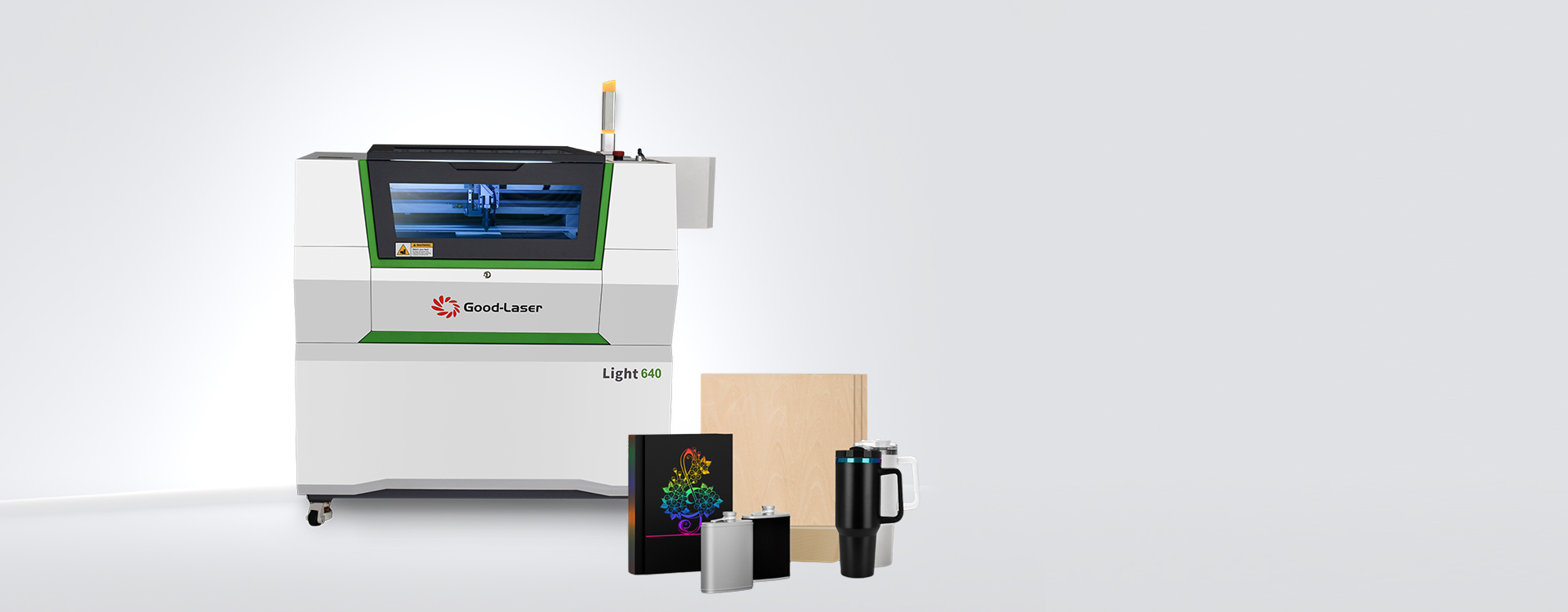
Once your product list points toward laser cutting, compare work area with the actual sheet layout. The space occupied by one finished piece is only part of the calculation: account for spacing between parts, fixtures and any margin needed around the job.
| Good-Laser option | Published working area | What to check with your sample |
|---|---|---|
| Light 530 CO2 laser engraver and cutter | 520 × 315 mm | Whether your standard sheet layout, engraving and outline cuts fit the work area |
| Light 640 CO2 laser cutter and engraver | 600 × 400 mm | Whether the larger layout improves batch output for your material and part mix |
These work areas are published on the linked product pages. Confirm the quoted configuration, power, extraction and cooling with Good-Laser. Maximum working speed is not the through-cutting speed for your chosen sheet, and a material list does not establish a guaranteed cutting thickness.
If your orders mainly require furniture joints or dimensioned pockets, continue evaluating a router. A CO₂ machine becomes more relevant when detailed sheet cutting and engraving make up a substantial part of your production.
Questions buyers often ask
Is a laser cutter a CNC machine?
A laser cutter with computer-controlled motion is a CNC machine. CNC describes how the machine is controlled. It does not specify the cutting tool. In a laser-cutter-versus-router comparison, the useful distinction is between thermal processing with a beam and mechanical removal with a rotating cutter.
Can a laser cutter make three-dimensional objects?
It can cut flat pieces that assemble into a three-dimensional object, such as a model building or a box. Some systems also support relief engraving. That differs from machining a contoured surface or a dimensioned pocket in a solid block, where a suitable CNC router is generally the more direct choice.
Which machine is better for a small business?
A business focused on engraved gifts and compatible thin-sheet products should evaluate a laser first. A business selling carved signs, furniture components or parts with pockets should evaluate a router. Compare a normal order on each suitable machine, including setup, finishing and rejected parts, before committing to capacity or payback estimates.
Can either machine cut aluminum?
A sufficiently rigid router can machine some aluminum jobs with appropriate tooling, workholding and chip control. The workshop CO₂ machines discussed here should not be selected as aluminum sheet cutters. Marking a coating or anodized surface is a different operation from cutting through metal. Metal laser cutting requires an appropriately specified system.
Which is easier for a beginner to learn?
A simple vector engraving or outline cut may involve fewer tooling decisions on a laser. Routing introduces cutter selection, cutting depth and workholding alongside the file setup. Both require training, approved materials and safe operating procedures. Try preparing and running one representative job during a demonstration to assess the learning involved.
Should a workshop own both?
Both can be useful when the product requires separate operations. A router might machine a recessed wooden base while a laser makes the acrylic insert. Before adding a second machine, compare the expected workload with outsourcing that operation. Allow for a second setup, maintenance schedule and training requirement.
Choose with a drawing and a material sample
Prepare the file you intend to manufacture, the exact material and thickness, the largest part size and the quantity per batch. Mark the smallest features and any dimensions that must fit another component. Tell the supplier which edge finish would pass inspection.
If that job calls for CO₂ cutting and engraving, request laser engraving samples from Good-Laser using your material and design. Include a through-cut in the test if your product needs one. Ask for the processing time and a finished sample, including any cleanup. You can then judge the machine against the product you need to deliver.