Laser Engraved Gifts: Ideas, Materials and Machine Guide
The best laser engraved gifts get used. Bad ones look “personalized” for five minutes and then disappear into a drawer. The difference usually has little to do with adding more decoration. It comes down to choosing a decent object, engraving something that matters to the recipient and using a material that gives a clean result.
Wood boxes, acrylic signs, glassware, leather accessories and metal tags can all work. They do not belong on the same machine, though. This guide is for gift buyers, makers and small studios that need to connect an idea with the right blank, workflow and laser engraving machine.
The short version: Pick the gift first and the engraving second. One meaningful detail—a name, date, set of coordinates, piece of handwriting or simple logo—is usually enough. Wood feels warm, acrylic looks clean and modern, glass and stone feel more formal, and metal suits jewelry, tags and business gifts.
If you are making these to sell: approve the artwork at actual size, engrave the real blank and time the whole job before promising a price or delivery date. Skipping that test is how a profitable-looking order turns into rework.
A Name Is Not Enough
Putting a name on a random object is easy. Making the object feel as though it was chosen for that person takes more thought. A serving board can preserve a handwritten recipe. A desk plaque can pair a company mark with the recipient's start date. A travel tag might need nothing more than initials and a tiny map symbol.
The engraving should support the gift. If it becomes the only interesting thing about the product, the product itself probably needs another look.
Before opening the design file, answer four questions:
- Recipient: What does this person use, display or carry?
- Occasion: Does the gift celebrate a milestone, a relationship or a business event?
- Material: Which blank matches the desired look and can be processed safely?
- Personal detail: Which name, date, drawing, photo or short message makes the object specific?
For a colleague or a large event, keep it restrained: a logo, initials or one short line. Weddings and family keepsakes can carry more detail, especially handwriting, coordinates or a date with a clear story behind it. Good gift laser engraving starts with the person and the object. Machine settings come later.
Choose the Gift Before the Engraving
| Gift idea | Common blank | Personalization that works | Laser starting point |
|---|---|---|---|
| Wedding keepsake | Wood box, acrylic sign or glassware | Names, date, venue line art | CO₂ for many non-metal blanks |
| Corporate gift | Tumbler, pen, desk plaque or notebook | Logo, recipient name, short message | Match coating or base metal to the source |
| Birthday gift | Photo plaque, keychain or jewelry box | Portrait, hobby icon, private phrase | CO₂ or blue light for compatible craft materials |
| Housewarming gift | Serving board, slate coaster or address sign | Family name, coordinates, house outline | CO₂ for wood, glass and many decorative blanks |
| Pet keepsake | Tag, portrait plaque or memorial stone | Name, dates, photo or paw print | Fiber for bare metal tags; test other blanks |
| Event favors | Wood, acrylic or coated-metal tokens | Names, table number, event mark | Choose a setup that supports repeatable batch fixtures |
Weddings and anniversaries
Serving boards, ring boxes, glassware, acrylic table signs and wooden photo frames all have a life after the wedding. That matters. Names and dates are safe choices, but a venue outline, one line from a speech or a simplified detail from the invitation will usually feel less generic. When producing favors, restrict the variable fields and use a fixture. Hand-aligning dozens of pieces is slow and invites visible drift.
Birthdays and family milestones
Photo plaques, jewelry boxes, keychains, bookmarks and desk signs cover a wide price range. Do not try to fill every empty corner. One focal point is enough. Portraits need special care: eyelashes and hair that look sharp on a monitor may turn into a dark patch on wood or a small tag. Engrave a cropped test before risking the finished piece.
Housewarming and home gifts
Address signs, slate coaster sets, recipe boards, bottle openers and layered acrylic décor are useful without feeling purely utilitarian. Ask where the item will live. An outdoor sign needs the right finish and mounting method. A kitchen gift needs honest care instructions. Deep decorative grooves across a food-contact surface may photograph well, but they can make cleaning harder.
Corporate gifts and employee recognition
Corporate laser engraved gifts are usually standard products with variable names, roles or locations. Pens, notebooks, drinkware, desk awards and tool tags suit this model. Lock the logo size and position. Set a maximum name length. Then put every variable field on one proofing sheet. Perfect engraving cannot rescue a misspelled name.
Pet gifts and memorial keepsakes
Pet portraits, name tags, framed silhouettes and stone memorial pieces can use a photo, paw print, dates or a short message. Small tags need restraint. Identification details must remain readable; decoration comes second. For memorial work, send a final proof that shows the exact image and wording. This is not an order where “close enough” is acceptable.
Seasonal gifts and event favors
Ornaments, place cards, small tokens and gift tags become much easier when several pieces share one layout. Build in time for warped wood, chipped blanks and the occasional bad mark. Save the jig, font and layout with the order. Next season, you will be glad you did.
Where Each Material Earns Its Place
The blank decides more than the color of the finished mark. It affects texture, cleanup, durability and how the job must be set up. Two products sold under the same material name can behave differently because of coatings, adhesives or pigments. If the supplier cannot identify the material, do not guess. Use a documented laser-compatible blank and test one from the batch you will actually engrave.
| Material | Suitable gift examples | Visual character | What to confirm |
|---|---|---|---|
| Wood | Boards, boxes, ornaments, coasters | Warm, natural contrast | Species, coating, adhesive, grain and food-contact use |
| Acrylic | Signs, night-light panels, ornaments, awards | Crisp, modern and color-flexible | Cast or extruded type, color, thickness and wavelength response |
| Glass | Drinkware, bottles, photo panels | Frosted surface effect | Glass composition, curvature, fixture and acceptable surface texture |
| Leather | Wallets, luggage tags, notebook covers | Tactile and understated | Exact composition, backing, finish, residue and odor |
| Slate or stone | Coasters, plaques, memorial pieces | High contrast with natural variation | Surface flatness, batch variation and sealing method |
| Metal | Jewelry, tags, pens, tools and tumblers | Precise and durable-looking | Alloy, coating, desired depth or contrast, and laser source |
Wood for warm, natural gifts
Wood is the obvious starting point for boxes, boards, signs, ornaments and coasters. It can carry engraved detail and be cut into the final shape on the same system. It is not perfectly predictable. Grain, resin and plywood adhesive all influence contrast and edge quality. Measure the real sheet before drawing press-fit joints, and use the wood laser cutter guide when narrowing the machine choice.
Acrylic for modern signs and displays
Acrylic makes clean-looking name signs, awards, ornaments and illuminated panels. Cast, extruded, clear, colored and mirrored sheets are not interchangeable. Choose the sheet and the laser source together. Leave protective film in place when the process allows it, because a polished panel covered in handling scratches is still a rejected panel.
Glass, slate and stone for elegant keepsakes
Glassware and bottles can take on a soft, frosted mark. Slate and stone tend to give stronger contrast, with natural variation from piece to piece. Curved glass usually adds a rotary fixture and more setup. Approve several stone pieces, not the prettiest sample in the box, and decide whether the finished item is decorative, washable or meant to stay outdoors.
Leather and fabric for tactile accessories
Wallets, luggage tags, patches and notebook covers need little artwork to feel finished. Initials, a small line drawing or a logo will do. The risky part is the blank. “Synthetic leather” can refer to very different formulations, so get the composition and backing in writing. If the supplier cannot confirm laser compatibility, choose another product.
Metal for jewelry, tags and premium business gifts
“Metal engraving” is too vague to buy a machine from. Removing paint from a tumbler is a different job from marking stainless jewelry or cutting depth into a brass plate. Write down the alloy, finish and required result. Will the mark be dark, bright or recessed? Will the piece be polished afterward? A sample that answers those questions is more useful than a long compatibility list.
Do the Boring Proofing Work
The outer dimensions of a product are not the engraving area. Hinges, curves, handles, seams and hardware all steal space. Put the artwork on a photo or outline of the real blank, then view it at actual size. A 6-point script can look elegant at 200% zoom and unreadable in your hand.
- Ask for the right file. A vector logo or clean, high-resolution black-and-white image saves repair time. Keep the approved wording exactly as the customer supplied it.
- Pick one focal point. The main name or symbol should be obvious. Dates and supporting text can sit back.
- Use fewer fonts. One characterful face and one plain supporting face are usually enough. Thin script falls apart quickly on textured material.
- Put variable data on one sheet. Names, dates and serial fields are easier to approve together than across dozens of separate files.
- Engrave the hardest detail first. Test the smallest text, tightest spacing or darkest area of a photo. If that works, the rest of the design is less likely to surprise you.
Photos need a crop and contrast adjustment for the chosen material; sending the original straight to the machine rarely gives the best result. Clean paper texture and shadows from handwriting, but do not smooth away the stroke that makes it recognizable. And if the file is a logo, confirm the customer has the right to reproduce it.
When One Order Becomes Production
A one-off keepsake can absorb ten minutes of careful alignment. A 100-piece company order cannot. Once quantity rises, the job needs controlled blanks, a fixture, reliable data and scheduled inspection. Otherwise the same small error gets copied 100 times.
- Qualify the request. Record the blank material, dimensions, artwork, quantity, deadline and required finish.
- Approve a digital proof. Show spelling, scale and placement. Identify any element that may change between pieces.
- Make a physical sample. Use the real material and proposed production configuration.
- Build a fixture. A simple corner jig or multi-position tray can control alignment and loading time.
- Time the whole cycle. Include file preparation, loading, focus, engraving, unloading, cleaning and packing.
- Inspect at defined intervals. Check placement, readability, surface condition and variable data before an error spreads through the batch.
Keep the approved file, blank supplier, fixture version, machine configuration and one inspection photo together. It is unglamorous paperwork. It is also what lets you quote a repeat order without rebuilding the process from memory.
Pick the Laser from the Blanks, Not the Brochure
List the products you plan to make, then choose the machine. Reversing that order is expensive. A studio producing wood signs and acrylic displays needs something very different from a shop marking stainless jewelry and anodized tags. Working area and laser source come first. Fixtures, extraction, software and total cycle time come right behind them.
| Production need | Likely machine family | Why it may fit | Proof before purchase |
|---|---|---|---|
| Mixed wood, acrylic, paper and leather gifts | Desktop CO₂ | Broad non-metal processing and cutting capability | Samples on exact blanks, work-area fit and full cycle time |
| Compact craft production on compatible materials | Enclosed blue-light system | Small-studio format and detailed personalization | Wavelength response, edge quality, ventilation and fixture compatibility |
| Bare-metal jewelry, tags and promotional items | Fiber marking system | Efficient marking on many metals and selected plastics | Alloy, surface finish, mark contrast or depth and working height |
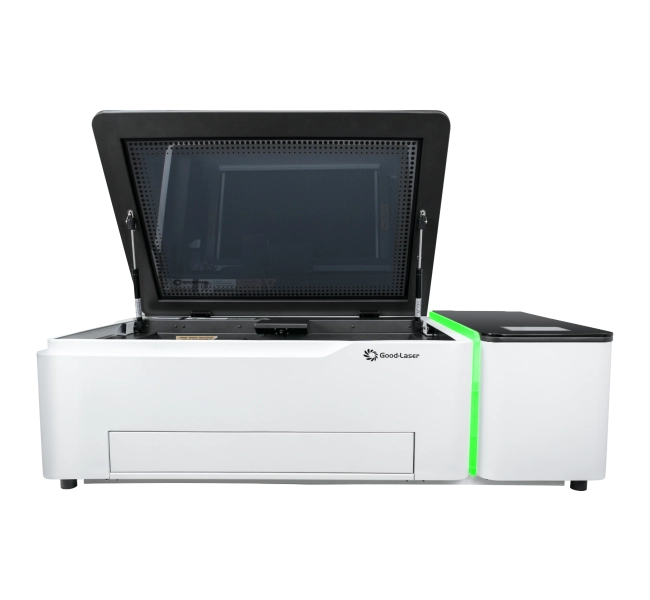
Light 530 for mixed non-metal gift work
The Good-Laser Light 530 is a 55W desktop CO₂ system with a 520 × 300 mm working area and camera-assisted positioning. Those numbers make it a sensible machine to evaluate for compatible wood, acrylic, paper, leather and fabric gifts, especially when a job needs cutting and engraving in one workflow. Check the desktop laser engraver range, but make the final decision from a sample on your own blank.
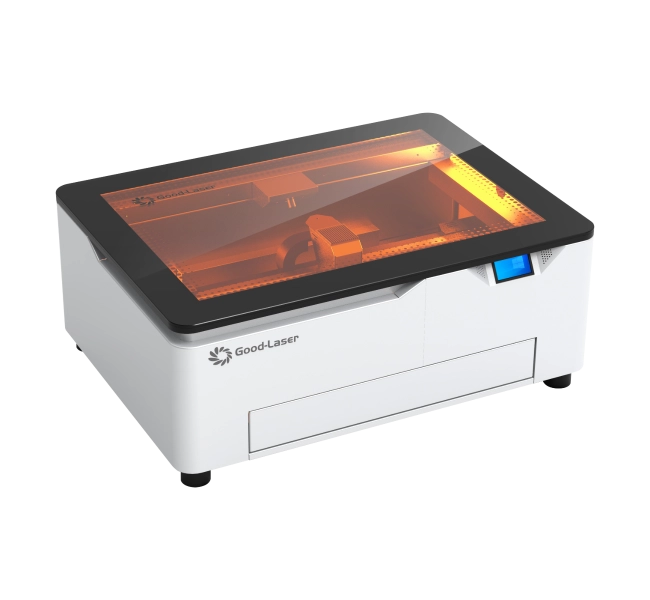
Light Blue 530 for compact craft personalization
The Light Blue 530 comes with 20W or 40W blue-light options and a 520 × 315 mm working area. It is aimed at compact creative work on compatible wood, paper, leather and selected coated or dark blanks. Studios that want an enclosed desktop format should compare the blue laser engraver range. Clear, pale, reflective and coated products still need testing; the word “acrylic” or “metal” on an invoice does not tell you how a wavelength will behave.
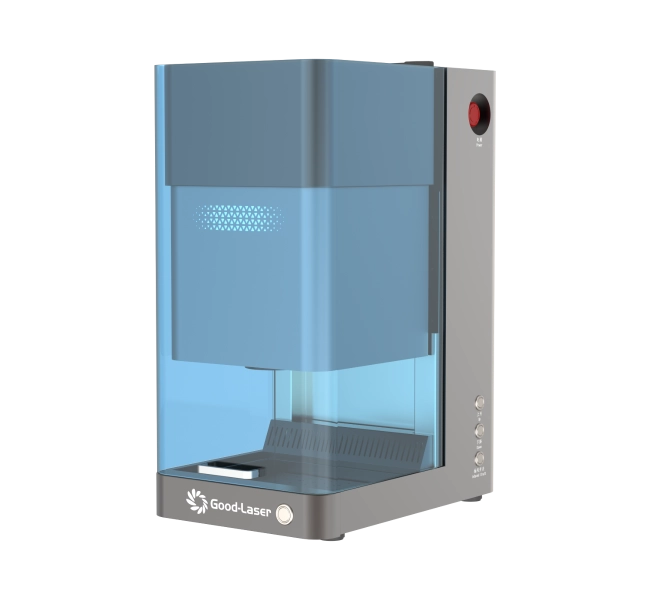
Mark M20 for metal gifts and premium identifiers
The Mark M20 is a desktop fiber marking system offered in 20W, 30W and 50W configurations, with a 110 × 110 mm marking area. It is built around work on stainless steel, aluminum, brass, compatible coated materials and selected plastics. If your product list is mostly jewelry, metal tags, pens, tools or nameplates, a fiber laser engraving machine deserves the first test. Bring the real alloy and finish. “Stainless steel” alone is not a complete sample brief.
Before It Leaves the Shop
- The spelling, date and artwork match the signed proof.
- The engraving is centered and consistent across the batch.
- Fine text remains readable at normal viewing distance.
- The surface has no unacceptable residue, scratches or handling marks.
- Edges, fixtures and hardware are safe and appropriate for the intended use.
- Care instructions match the material, coating and finish.
- Packaging prevents pieces from rubbing against one another in transit.
Before choosing equipment, request laser engraving samples made from the exact material, or the closest one available. Hold the sample, wash it if the finished item will be washed and view it under normal room light. A close-up photo cannot tell you how the object feels in use.
Frequently Asked Questions
What are the most practical laser engraved gifts?
Coasters, serving boards, keychains, drinkware, desk plaques, notebooks, jewelry and pet tags are practical because recipients can use or display them. The best choice matches the person's routine and uses a blank that produces a clean, durable result.
What can I engrave on a personalized gift?
Common options include names, dates, coordinates, handwriting, line-art portraits, logos, QR codes and short messages. Keep the design proportional to the usable engraving area and avoid placing too much text on small objects.
Which material is best for a first engraved gift?
A flat wood or coated blank is often easier to position than a curved or highly reflective object. The best first material is one your machine supports, your supplier documents clearly and you can test with spare pieces.
Can a laser engrave a photo on a gift?
Yes, on suitable materials and with properly prepared artwork. Crop for the object, adjust tonal range and test the most detailed area. Photo results depend on image quality, material contrast, laser source and settings.
Do I need a rotary attachment for engraved gifts?
A rotary fixture is commonly needed for cylindrical items such as tumblers, bottles and some glassware. Confirm diameter, length, weight and clearance with the machine and attachment before accepting the job.
Are laser engraved gifts permanent?
Durability depends on whether the process removes a coating, changes the surface or removes base material. Wear, washing, sunlight and chemicals can affect the appearance. Test the exact blank under its expected use conditions instead of promising a universal lifespan.
What information should I send when choosing a laser for gift production?
Send the material and coating, product dimensions, artwork type, engraving area, monthly quantity, desired finish, need for cutting or rotary work, and sample photos. These details make machine recommendations and testing more useful.
Bring Three Real Blanks
Do not choose a gift-production machine from a single perfect demo piece. Bring three products: a simple flat item, one with variable names or dates and the blank that will be hardest to fixture or mark. If the proposed setup can handle all three cleanly and at a workable cycle time, the buying discussion becomes much more useful.
Send Good-Laser the blank dimensions, material and coating details, artwork, likely order volume and the finish you expect. The team can compare CO₂, blue-light and fiber options around the work you actually plan to sell. Talk to Good-Laser about your laser engraved gift project.